Launcher iOS 26
- 4.7
- Rating
- 10.00M
- Installs
- Free
- Price

 Analysis by App-foxy
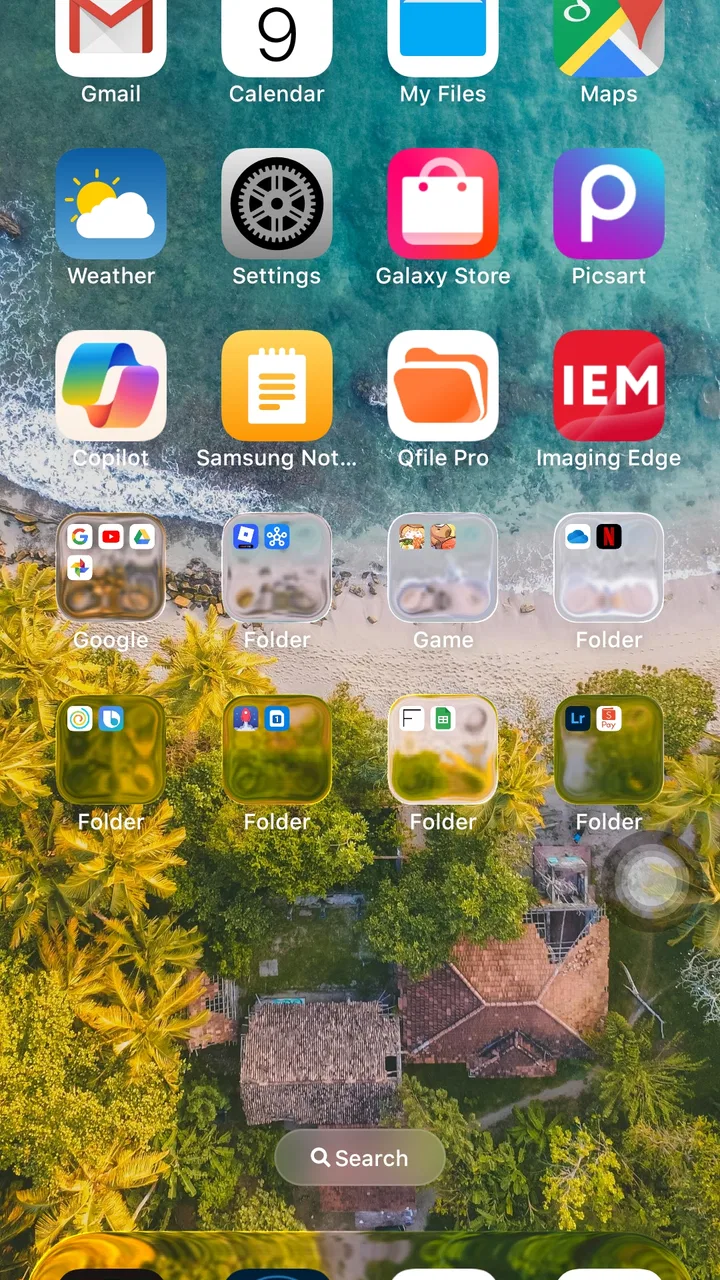
I approached Launcher iOS 26 as a personalization app for anyone who likes the look and feel of an iPhone but does not want to leave Android. After using it as a replacement for the standard home screen, my first impression was clear: its appeal comes from presentation rather than from adding a completely new way to use a phone. It changes the visual character of Android, making the interface feel more uniform, polished, and deliberately styled.
That focus makes it easy to understand. You are not installing a productivity suite, a social platform, or a tool that needs a long learning period. You are changing the layer you interact with every time you unlock the device. The developer is LuuTinh Developer, and the app is free, which makes experimenting with it relatively straightforward. I would describe it as a visual makeover with practical consequences, not merely a wallpaper pack.
How the iOS-style experience feels in everyday use
The strongest part of the app is the consistency of its visual direction. Instead of mixing the phone maker’s icons, menus, and home-screen behavior with a separate theme, it tries to create a more unified iOS-inspired environment. That matters when you want your home screen to look intentional rather than assembled from unrelated pieces.
You May Also Like

 Blood Strike: 2.5 Anniversary
Blood Strike’s Loadouts Turn Every Drop Into a Tactical Gamble
A close look at Blood Strike’s custom loadouts: how fast access to signature weapons reshapes its battle royale rhythm, rewards preparation, and narrows the gap between fights.

 Pandora - Music & Podcasts
Pandora’s Music Is Easy to Start, but Harder to Recover
Pandora’s strength is its low-effort path from a seed to a station. Its weak spot is how much confidence it asks you to place in connection, setup, and quiet recovery.

 8 Ball Pool
 Is Built on Rivalries, Rematches, and Routine
A close look at the rivalries, rematches, shared routines, and unanswered safety questions that turn a quick pool match into a persistent mobile community.

 Samsung Music
’s Quiet Strength Is Playing What You Already Own
Its reach comes less from spectacle than from dependable access to a personal library. That simplicity is both the app’s strongest retention engine and its ceiling.

 AccuWeather: Weather Radar
AccuWeather Review: A Quick, Clear Forecast for Everyday Decisions
For everyday plans, the best forecast is the one you can understand quickly. AccuWeather makes rain timing, radar, and local conditions easy to act on, with a few trade-offs.

 Hill Climb Racing
Why Hill Climb Racing Still Turns Crashes Into One More Run
A tiny car, a bumpy hill and one more upgrade: Hill Climb Racing keeps resurfacing because its simple chaos makes every near-miss feel personal.
More From Our News Desk



In normal use, the value is most obvious during small repeated actions: unlocking the phone, moving between home pages, opening the app area, and returning to the main screen. These moments are brief, but they happen constantly. A launcher succeeds when it makes those transitions feel familiar and predictable. Here, the design gives Android a noticeably different personality without requiring me to replace the phone itself.
I especially see the appeal for someone moving from an iPhone to Android, or for an Android owner who prefers Apple’s restrained visual language. It can also suit people who find their manufacturer’s interface too busy. The change is more substantial than applying a single background, yet less disruptive than replacing the entire operating system or buying a different device.
There is an important distinction, though. This is an iOS-style experience, not iOS itself. The phone remains Android underneath, so system settings, app behavior, notifications, and manufacturer-specific controls still belong to Android. Anyone expecting a perfect copy of Apple’s operating system will eventually meet that boundary. For me, that is not a flaw as long as expectations are set correctly.
What happens to perceived speed
A launcher sits in a sensitive place because it is visible whenever I use the phone. Even a small delay can feel more annoying there than in an app opened once a day. In my experience, the interface feels most convincing when I keep the home screen organized and avoid treating it as a constantly changing display. The cleaner the arrangement, the more the visual style contributes to a sense of smoothness.
Perceived speed is not only about raw processing power. It also comes from how quickly I can recognize an icon, return to a familiar position, or reach the next app without thinking. The iOS-inspired layout helps in that respect by giving the screen a clear visual identity. It does not magically make a slower phone powerful, but it can make routine navigation feel more deliberate.
I would not install it solely to accelerate an older device. A launcher is another layer between the user and the stock home experience, so the result depends on the phone, its available memory, and what else is running. On a modest handset, the best approach is to judge it by responsiveness during ordinary navigation rather than by the appearance of the first screen alone.
One useful habit is to spend time arranging the home screen once instead of repeatedly redesigning it. Constantly changing icons, pages, and shortcuts can make any launcher feel less settled. I found that a simple first page for daily apps, followed by less frequently used tools, gives the design room to work without turning the phone into a visual project.
Heavy-use moments reveal the trade-offs
The most demanding moments are not necessarily when I open one app. They are the transitions around the launcher: returning from a game, jumping between several apps, or waking the phone after it has been busy for a while. These are the situations where a replacement home screen has to recover its place and present the interface again. A good-looking launcher is less useful if it makes me hesitate whenever I leave a demanding application.
For everyday tasks such as checking messages, opening a browser, or launching a camera, the app’s purpose is easy to appreciate. It keeps the visual experience consistent between those actions. During heavier sessions, however, I would pay attention to whether the home screen returns promptly and whether the arrangement remains intact. If a phone is already under pressure, the launcher cannot control every part of that recovery process.
This is also where I would avoid judging the app solely by a short first session. A launcher can feel excellent immediately after installation, then reveal its real character after a day of normal use. I recommend testing it through a complete routine: unlock in the morning, open several apps, return home repeatedly, and use the phone when its battery is lower or background activity is higher. That gives a more honest impression than simply admiring the initial visual change.
A practical trade-off is that the more you want the phone to resemble an iPhone, the more carefully you may need to accept Android’s own habits. The launcher can shape the home experience, but it does not erase every difference between platforms. Users who frequently rely on manufacturer-specific widgets or tightly integrated home-screen functions may prefer the original launcher, even if it looks less elegant.
Stability and recovering from interruptions
Reliability matters more to me in a launcher than in a decorative theme because it is part of the phone’s daily entry point. If the home screen behaves unexpectedly, the whole device feels unreliable, even when the problem is limited to that layer. My standard test is simple: leave the home screen, switch through several tasks, lock the device, unlock it again, and see whether the layout still feels like the same environment.
The app has earned a strong public response, with an average rating of 4.6 from around 264 thousand ratings and roughly 2.3 thousand written reviews. More than 10 million installations also show that the concept has reached a broad Android audience. Those figures do not guarantee identical behavior on every phone, but they suggest that this is an established choice rather than an obscure experiment.
When a launcher seems to recover slowly, I would first separate the app from the phone’s broader condition. A crowded device, aggressive background management, or a manufacturer’s own interface rules can affect how quickly the home screen returns. Restarting the phone is a basic but worthwhile check before deciding that the launcher itself is unsuitable. I would also keep the arrangement uncomplicated while testing, because a minimal setup makes it easier to identify the source of any friction.
There is another kind of recovery to consider: recovering from a change of mind. If you try the app and decide that the original interface suits you better, switching back to the phone’s default launcher should be part of your normal Android settings experience. I recommend knowing where that option is before making a replacement launcher your daily home screen. That small preparation removes much of the anxiety from experimentation.
Older phones and minimum system support
The app supports Android devices starting with version 5.0, so its compatibility reaches well beyond recent phones. That is useful for people with older hardware who want a visual refresh without buying a new device. Still, broad operating-system compatibility should not be confused with identical performance. Two phones running the same Android generation can feel very different depending on their hardware and the manufacturer’s software.
On an older phone, I would keep the test realistic. Use the device as you normally do, rather than filling the home screen with every possible shortcut and then blaming the launcher for a general slowdown. If the phone is already struggling with basic transitions, a new visual shell may not be the right solution. In that situation, the stock launcher, with fewer layers and fewer changes, may be the safer choice.
On a newer phone, the decision is less about whether it can run the app and more about whether the style justifies replacing a well-integrated default. Some manufacturer launchers connect neatly with their own widgets, gestures, and settings. If those features are central to your routine, an iOS-inspired alternative may feel attractive for a week but inconvenient afterward.
I also think about battery and resource demands in practical terms rather than assuming that every launcher is automatically lightweight or heavy. The app’s role means it remains close to the surface of the system, so I would monitor how the phone feels over a full day instead of relying on a single launch. If battery life, heat, or background behavior becomes noticeably worse, that is a meaningful reason to return to the default interface, regardless of how attractive the design looks.
Who will get the most from it
This app is a good fit for Android users who want a recognizable iPhone-like visual atmosphere without changing their hardware. It is also useful for someone who has grown tired of a manufacturer’s crowded home screen and wants a cleaner, more coherent presentation. Because it is free and rated for Everyone, it is accessible to a wide range of users, including families looking for a simple personalization experiment.
I can imagine a realistic everyday scenario: a person switches from an iPhone to an Android phone for hardware or price reasons but keeps missing the familiar visual rhythm. Instead of spending days rebuilding the experience manually, they install this launcher, place communication and travel apps on the first page, and use the new layout as a bridge between the two platforms. It will not reproduce every Apple behavior, but it may make the transition feel less abrupt.
Another useful case is a shared or secondary phone that feels visually inconsistent after years of updates. A carefully arranged launcher can give it a fresh identity without requiring a complete reset. I would keep the setup modest, use clear app placement, and treat the visual change as a way to make the device easier to approach rather than as a promise of better hardware performance.
I would skip it if you depend heavily on the phone maker’s own home-screen integration, dislike iOS-inspired design, or expect a launcher to fix general sluggishness. It is also not the best choice for someone who wants deep customization in every direction. Its appeal is strongest when you want one specific visual destination, not unlimited experimentation.
How it compares with the usual alternatives
The default Android launcher is usually the most practical alternative. It is already adapted to the phone, tends to work naturally with the manufacturer’s settings, and avoids the adjustment period that comes with a replacement. If stability and integration matter more than appearance, I would begin there. The reason to choose this app is the distinct visual transformation, not an assumption that every phone function will improve.
General-purpose third-party launchers are another option. They often appeal to users who want to control grids, gestures, icon arrangements, and other details in a highly personal way. Launcher iOS 26 makes more sense for someone who already knows the style they want and prefers a guided direction. The trade-off is freedom: a broad customization tool can be better for a person who enjoys building an individual interface from scratch.
Icon packs and wallpaper apps offer a lighter alternative. They change the surface while leaving the original launcher in place, which can preserve manufacturer integration. That approach may be enough if you only want visual decoration. I would choose this app instead when I want the home-screen experience itself to feel coordinated, rather than simply placing iPhone-like images over the existing layout.
The key comparison is therefore not “which launcher is universally best?” but “how much of the phone do I want to change?” The default option changes almost nothing, an icon pack changes the appearance, and this app changes the main interaction layer. That middle position is exactly why it can be appealing, but also why testing it through real routines is worthwhile.
Version, support, and the final performance judgment
The current version is 8.8.1, and the app was released on December 27, 2022. I would keep the installed version current through the normal app store process, especially when the launcher is responsible for the first screen I see each day. Updates can matter more for a launcher than for a rarely opened utility because small compatibility differences become visible across many daily interactions.
After weighing the visual benefit against the practical compromises, my verdict is positive but specific. This is a convincing personalization choice for Android owners who want an iOS-inspired home experience and are willing to accept that the underlying phone remains Android. Its perceived speed is best when the device is healthy and the layout is kept purposeful; its reliability should be judged on the individual handset; and its resource impact deserves a full-day check rather than an assumption.
The best reason to install it is visual consistency, not a promise of faster hardware. That distinction keeps expectations realistic. I would recommend trying it on a spare or everyday phone, arranging a small number of essential apps, and testing unlocks, app switching, and return-to-home behavior before committing fully. If those basic actions feel natural, the makeover can be genuinely enjoyable.
For me, the app succeeds because it gives Android a clear new identity without asking the user to learn a complicated system. The free price makes the experiment easy, while the broad audience and strong rating show why the idea has lasting appeal. I would recommend it to friends who miss the look of an iPhone or want a calmer Android home screen. I would not recommend it to someone whose priority is maximum manufacturer integration or solving a phone that is already struggling. In the right situation, it is a polished visual change; in the wrong one, the familiar default launcher remains the more dependable choice.
FAQs for Launcher iOS 26
01What is Launcher iOS 26 and how does it work?
Launcher iOS 26 is an app that transforms your Android device's interface to mimic the appearance and functionality of the latest iOS system. It includes features such as the control center, app library, and widgets, providing a seamless iOS experience. The app operates by replacing your default launcher, allowing for customization and easy navigation.
02Is Launcher iOS 26 safe to use on my Android device?
Yes, Launcher iOS 26 is generally safe to use. However, as with any app, it is recommended to download it from a reputable source like the Google Play Store to avoid potential security risks. The app requires certain permissions to function, so reviewing these permissions during installation is advisable to ensure your data remains secure.
03Will Launcher iOS 26 affect my device’s performance?
Launcher iOS 26 is designed to be lightweight and efficient, but, like all launchers, it may slightly affect your device’s performance, especially on older models. Users may notice minor lag or increased battery consumption. It's recommended to ensure your device meets the app’s requirements for optimal performance and to periodically clear cache and manage background processes.
04Can I customize the appearance of Launcher iOS 26?
Absolutely! Launcher iOS 26 offers extensive customization options to personalize your device. You can change icon styles, set various wallpapers, and modify the widget appearance to suit your preferences. The app aims to provide flexibility while maintaining the aesthetic appeal of an iOS interface, allowing for a personalized yet consistent user experience.
05Does Launcher iOS 26 support all Android devices?
Launcher iOS 26 supports a wide range of Android devices, typically those running Android 5.0 and above. However, performance and compatibility may vary based on the specific device model and its hardware capabilities. It’s advisable to check the app’s compatibility with your device in the Google Play Store before downloading to ensure a smooth experience.
Pros
- Seamless iOS-like interface.
- Customizable home screen options.
- Quick access to widgets.
- Smooth and responsive performance.
- Frequent updates with new features.
Cons
- May drain battery faster.
- Some features need in-app purchases.
- Occasional ads appear.
- Limited widget customization.
- Minor bugs in older Android versions.

Launcher iOS 26
Gallery